
Alfex Smart1.0.9 - Google Play
You'll be able to see results in few seconds.
Publisher Description
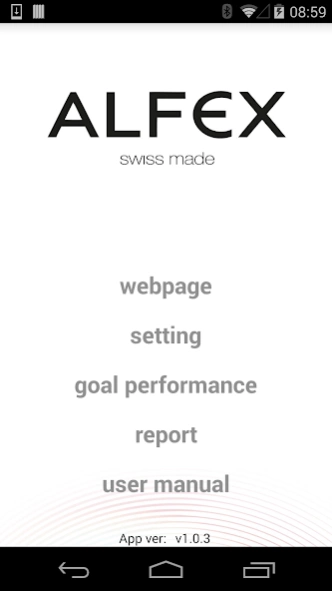
Welcome to the official Alfex smartwatch app.
Welcome to the official Alfex smartwatch app.
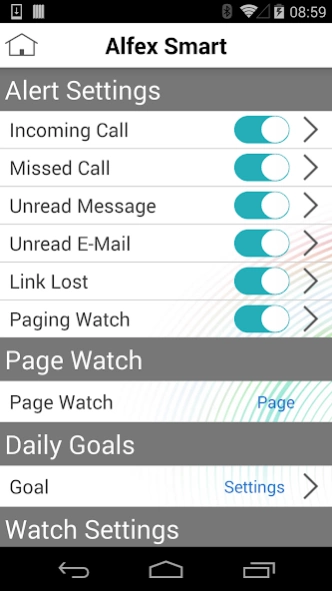
The Alfex smartwatch app connects your Alfex swiss made smartwatch to your iPhone or Android device using the latest Bluetooth® wireless technology, and notifies you to incoming calls, emails, messages and a broad range of other alerts.
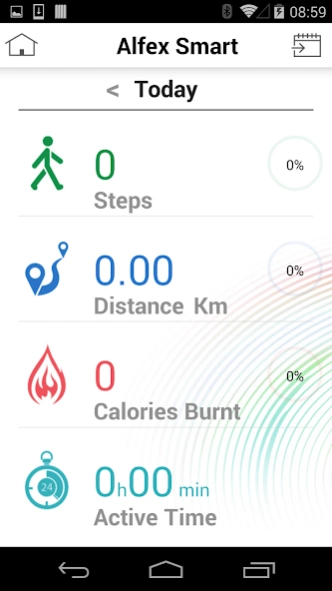
In addition the Alfex smartwatch app can be your personal coach, as it tracks your daily performance and shows how many steps you have taken, your distance covered and even calories burned.
You can customize the alerts and choose exactly how you would like to be notified for each type of alert: either throughout vibration, LED light or sound.
Besides these essentials functions, the Alfex smartwatch app offers 2 savvy features which simplify your life:
- Do you often lose your phone? Don’t worry the Alfex smartwatch app can help you find your phone by simply paging it.
- You want to take a selfie from some distance? Simply use the remote shutter function you can snap a selfie from far away without touching your phone.
Key Features
- notifies you to incoming calls, emails, messages
- tracks your steps, calories, distance and active time
- finds your phone
- remote camera shutter
Note
This app is intended to be used with an Alfex Swiss Made smartwatch. To learn more visit www.alfex.ch/smartwatch
In case you have any idea’s, suggestions or feedback we invite you to contact us on the following email address alfexsmart@alfex.com
the Alfex smartwatch is compatible with the following devices
Sony Z1
Nexus 5
Samsung Galaxy Note 2
Samsung Galaxy S4 Mini
Samsung Galaxy S5 Mini
Samsung Galaxy S5
Samsung Galaxy A5
Samsung Note 4
LG G3
About Alfex Smart
The company that develops Alfex Smart is Latitude Limited. The latest version released by its developer is 1.0.9.
To install Alfex Smart on your Android device, just click the green Continue To App button above to start the installation process. The app is listed on our website since 2019-03-25 and was downloaded 0 times. We have already checked if the download link is safe, however for your own protection we recommend that you scan the downloaded app with your antivirus. Your antivirus may detect the Alfex Smart as malware as malware if the download link to com.latitude.analogwatch is broken.
How to install Alfex Smart on your Android device:
- Click on the Continue To App button on our website. This will redirect you to Google Play.
- Once the Alfex Smart is shown in the Google Play listing of your Android device, you can start its download and installation. Tap on the Install button located below the search bar and to the right of the app icon.
- A pop-up window with the permissions required by Alfex Smart will be shown. Click on Accept to continue the process.
- Alfex Smart will be downloaded onto your device, displaying a progress. Once the download completes, the installation will start and you'll get a notification after the installation is finished.
Program Details
System requirements
Download information
Pricing
Version History
version 1.0.9
posted on 2019-03-25
Prompt message to accept Call Log/SMS permission
version 1.0.5
posted on 2016-08-22
v1.0.5,- Stability Improved,- Bug Fixed,v1.0.4,- Camera Improved,- Bug Fixed,v 1.0.3,- UI Implement,- Support Muti-Language,- Bug Fixed,v 1.0.2,- Bug Fixed,v 1.0.1,- First Release
Disclaimer
Official Google Play Link
We do not host Alfex Smart on our servers. We did not scan it for viruses, adware, spyware or other type of malware. This app is hosted by Google and passed their terms and conditions to be listed there. We recommend caution when installing it.
The Google Play link for Alfex Smart is provided to you by apps112.com without any warranties, representations or guarantees of any kind, so access it at your own risk.
If you have questions regarding this particular app contact the publisher directly. For questions about the functionalities of apps112.com contact us.
